All guides
Basics
Getting started: your first week
What we set up for you before you log in, and the handful of things to check on day one.
4 min read
JobOne is set up for you during onboarding — we migrate your customers and job history, build your website, and register your phone number. By the time you log in, most of the work is done. This guide walks the few things worth checking first.
app.getjobone.com
Read your home dashboard
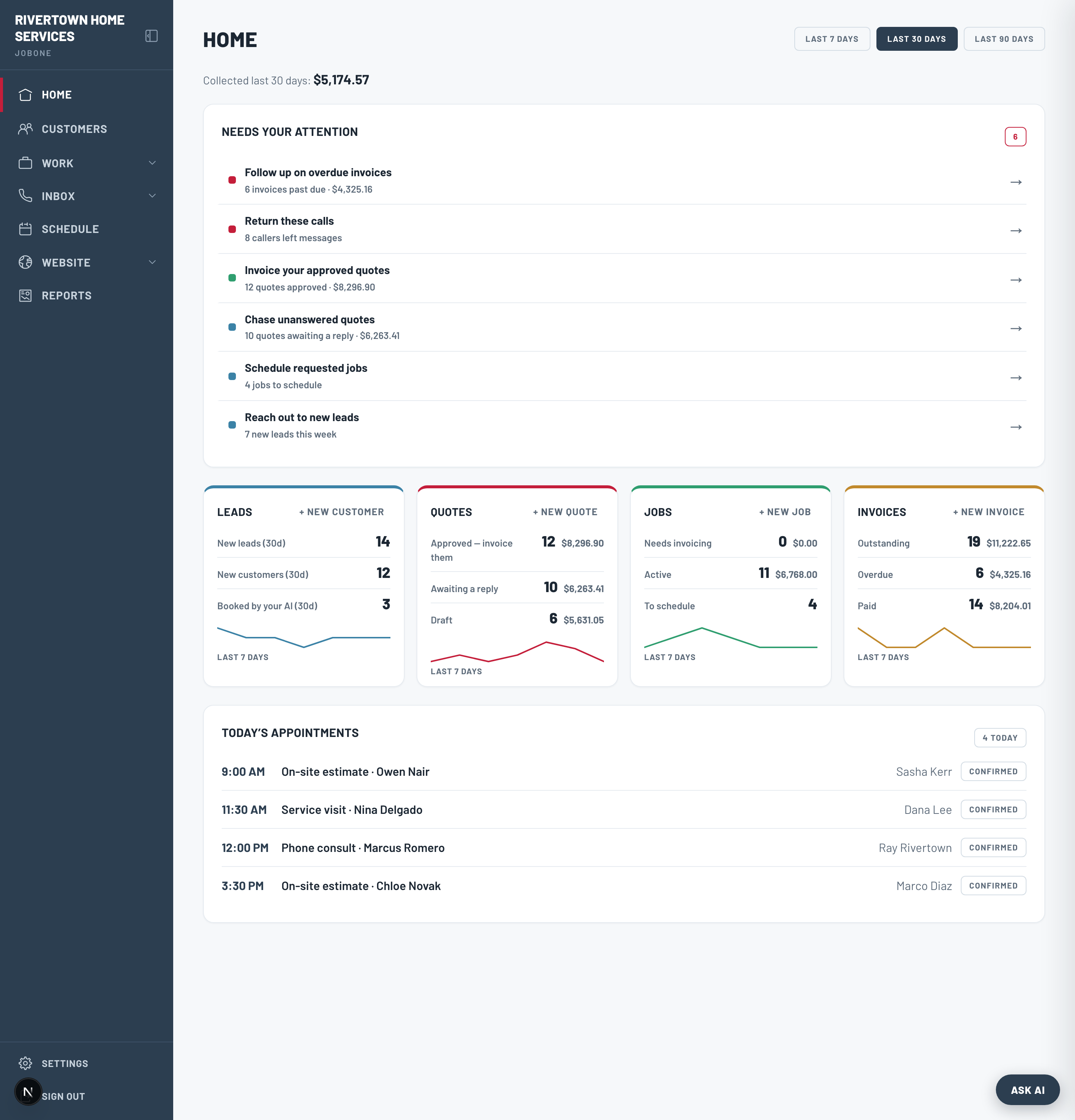
Home is the one screen you’ll open every morning. The “Needs your attention” feed surfaces what’s urgent — overdue invoices, callers to phone back, approved quotes to invoice — in priority order, each linking straight to the work.
- The money strip shows what you’ve collected in the last 7, 30, or 90 days.
- The four pipeline cards (Leads · Quotes · Jobs · Invoices) show counts, dollar value, and a 7-day trend.
- Today’s Appointments lists the day per person, so you know where everyone is.
Check these three things on day one
- 1Confirm your customers came across — open Customers and search a name you know.
- 2Set your business hours in Settings → Business details. Your hours decide when the AI books and when it takes a message.
- 3Turn on call-forwarding to your AI number so missed calls reach it (see the AI receptionist guide).
Tip
The slate “Finish setting up” nudge on Home tracks anything still outstanding (terms, payments, personalization). It disappears once you’re done.